
A whiteboard photo can preserve a meeting’s ideas, but turning those sketches into something a team can actually use often means recreating the work afterward. The OPPO AI Pen, paired with the OPPO Find N6, is designed to shorten that gap through two features: AI Chart, which converts hand-drawn diagrams into structured charts, and Global Annotation, which lets users write directly over documents and images.
Together, the tools target two common productivity bottlenecks: reconstructing meeting notes and consolidating feedback.
Turn whiteboard sketches into editable charts
The workflow starts with a photo of a whiteboard or a hand-drawn diagram.
Instead of manually recreating the diagram, Find N6 users can open the image and use the OPPO AI Pen to select the relevant area. Holding the pen’s button and circling the diagram activates AI Chart through AI Canvas.
The system then analyzes the structure of the sketch and converts it into a cleaner diagram.
The process is designed to work even when the original drawing is uneven. Arrows, shapes and spacing do not have to look like a finished presentation for the system to recognize the underlying structure.

Once the chart has been generated, users can edit its text and data, as well as apply different styles and color themes.
The OPPO AI Pen can also be used to make further handwritten changes, keeping the editing process closer to the original whiteboard workflow.
Export the finished chart for different workflows
Once the diagram is ready, users can export it in different formats depending on how they plan to use the converted content.
Supported export formats include image, PDF, PowerPoint, Excel, and XMind, with XMind availability depending on the type of chart being converted.
This makes the feature useful beyond simply digitizing a meeting photo. Converted diagrams can be added to presentations, included in meeting documentation, or shared with colleagues without requiring someone to manually redraw the original whiteboard content.
Mark up documents without switching between apps
The second workflow focuses on feedback. Reviewing a document on a phone often means taking screenshots, switching to a messaging app and explaining which part of the document each comment refers to.
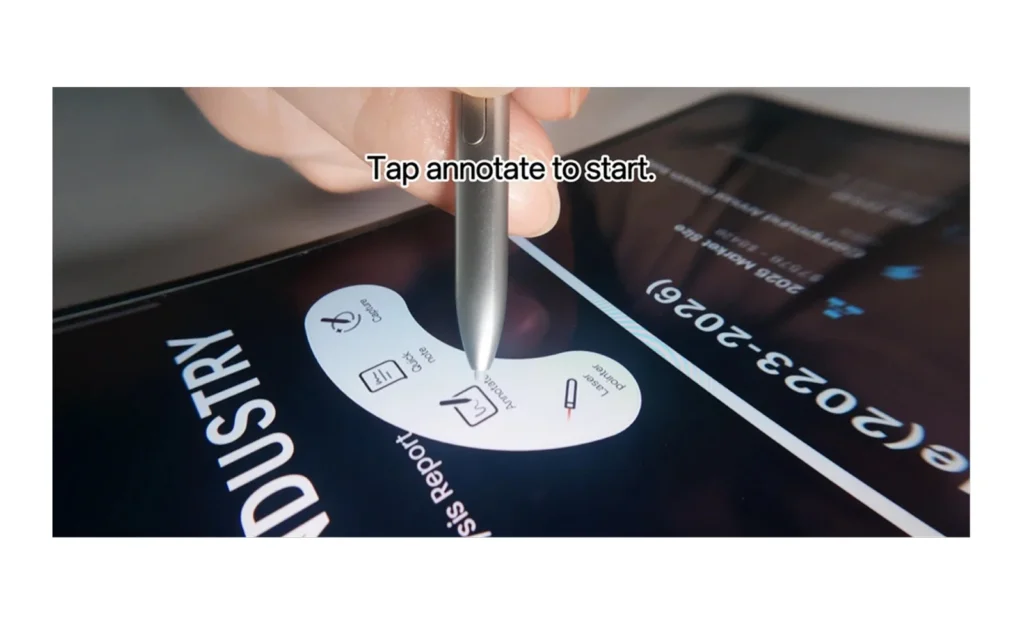
Global Annotation takes a different approach by allowing users to write directly over the content on the screen.
To activate it, users open the document or image, press the OPPO AI Pen button to bring up the Stylus Palette and select the annotation function.
The screen then becomes a handwriting canvas while retaining the original content underneath.
Scroll through long documents while annotating
Global Annotation is designed for longer pages as well. Users can scroll through a document while continuing to write, allowing comments, circles and other markings to stay tied to the relevant sections instead of being spread across multiple screenshots.

The pen can also use different stroke and ink colors. For example, reviewers could use separate colors for corrections, questions and follow-up items, making a long set of comments easier to scan.
The result is a more visual review process without requiring users to recreate their feedback elsewhere.
Share the finished feedback as a single file
After completing the review, users can share the annotated content directly.
Global Annotation supports exporting the result as a PDF or JPG, allowing the reviewer to send one consolidated file instead of a collection of screenshots and accompanying explanations.
That can be particularly useful for document reviews where context matters. Instead of telling a colleague which page or section a comment refers to, the feedback appears directly alongside the relevant content.
A more direct way to work on a foldable
The two workflows show how OPPO is using the Find N6’s larger foldable display and stylus support beyond conventional note-taking.
AI Chart focuses on converting physical brainstorming into digital work, while Global Annotation keeps feedback attached to the material being reviewed.
The common thread is reducing the manual steps between creating, reviewing and sharing information.
For users who regularly work with meeting notes, presentations, documents or visual feedback, the OPPO AI Pen turns the Find N6 into a more hands-on workspace—where handwritten input and AI-assisted processing can happen within the same workflow.