
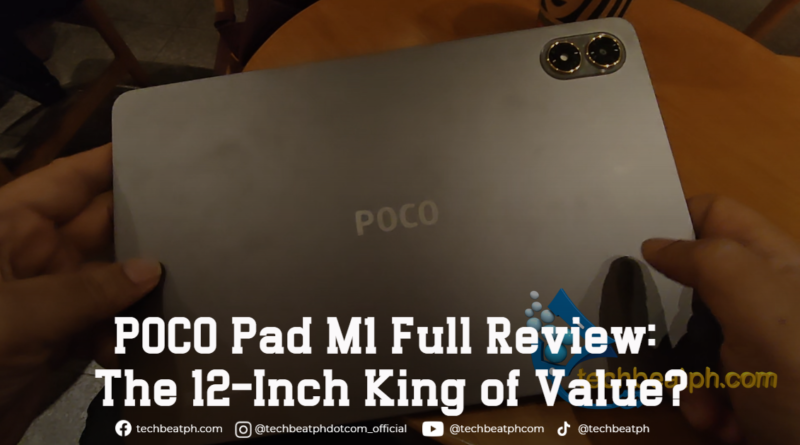
POCO Pad M1 Review: Redefining Mid-Range Tablet
POCO Pad M1 Review: Redefining Mid-Range Tablet Entertainment Value
The Android Tablet Identity Crisis Ends Here
For years, the Android tablet market has felt like a desolate wasteland of missed opportunities. Manufacturers seemed stuck in a loop, churning out oversized smartphones that offered little utility beyond a larger YouTube canvas, or attempting to build laptop replacements that cost as much as a used car. It was a segment defined by compromise. You either paid a premium for a “Pro” experience you didn’t need, or you settled for a budget slate that stuttered every time you tried to switch apps. POCO Pad M1 Review: Redefining Mid-Range Tablet
When the POCO Pad M1 arrived on my desk, I will admit my initial reaction was a practiced skepticism. POCO has a legendary reputation for disrupting the smartphone space—delivering flagship killers when everyone else is raising prices—but tablets are a different beast entirely. They require a balance of screen real estate, battery density, and software optimization that is notoriously difficult to nail. However, after spending a week using the POCO Pad M1 as my primary entertainment hub and secondary work machine, that skepticism has been replaced by genuine respect. This device isn’t trying to replace your laptop, nor is it trying to be a cheap throwaway screen. It is carving out a new identity as the ultimate entertainment companion for the mobile generation.
Visuals That Punch Above Their Weight Class
The interaction you have with a tablet is almost entirely visual, so the display is where a device lives or dies. POCO understood the assignment here. The Pad M1 sports a massive 12.1-inch LCD panel that boasts a 2.5K resolution (2560 x 1600). While OLED purists might mourn the lack of infinite contrast, in practical use, this screen is a triumph. The pixel density of 249 ppi ensures that text remains crisp even when you have your nose buried in a PDF, and the color reproduction is punchy enough to make anime and high-fidelity games pop. POCO Pad M1 Review: Redefining Mid-Range Tablet
But the specification that actually changes the game is the 120Hz refresh rate. In 2025, a 60Hz screen on a tablet feels like wading through molasses. The 120Hz AdaptiveSync technology on the Pad M1 makes the UI feel liquid. Whether you are doom-scrolling through social media or tracking a fast-moving target in Call of Duty: Mobile, the fluidity offers a tactile advantage that makes the tablet feel significantly more expensive than it is. Supported by Dolby Vision, the panel delivers excellent dynamic range for streaming, hitting a peak brightness of 600 nits. It won’t beat the sun at the beach, but for your bedroom or a coffee shop, it is more than sufficient.
Silicon Horsepower and The Storage Solution
Under the hood, POCO has equipped the M1 with the Snapdragon 7s Gen 4 Mobile Platform. Built on a highly efficient 4nm manufacturing process, this chipset is a significant leap forward for the mid-range segment. It features an octa-core CPU clocking up to 2.7GHz. In our benchmark testing, specifically AnTuTu, it cleared the 1.06 million mark.
What does this mean for the average user? It means headroom. I threw multiple layers of multitasking at it—streaming 1080p video while browsing Chrome and keeping discord open in a floating window—and the tablet didn’t blink. Gaming performance is equally robust. While you might not be maxing out ray-tracing settings on future-proof titles, current heavy hitters like Genshin Impact run smoothly at medium-to-high settings, maintained by the sheer surface area of the tablet which acts as a natural heat dissipator. POCO Pad M1 Review: Redefining Mid-Range Tablet
Paired with 8GB of RAM and 256GB of internal storage, the base configuration is generous. However, the standout feature for me is the microSD card slot, which supports expansion up to 2TB. In an era where flagship devices are removing expandable storage to force cloud subscriptions, POCO gives the power back to the user. You can essentially download the entire internet onto this slate and take it offline.
The 12,000mAh Endurance Monster
If the display is the face of the operation, the battery is its relentless heart. The POCO Pad M1 houses a colossal 12,000mAh battery. To put that in perspective, many laptops run on less. This capacity completely alters your relationship with the charger. During my review period, I struggled to drain the battery in a single day, even with intentional heavy use. POCO claims over 105 hours of music playback, and frankly, I believe them.
There is a caveat, however. Filling up a tank this size takes patience. The included 33W fast charging is decent, but it isn’t the warp-speed charging we see on POCO phones. You will want to charge this overnight. But POCO flips this narrative with a brilliant feature: 27W wired reverse charging. With the right cable, the Pad M1 transforms into a massive power bank. I was able to fast-charge my smartphone directly from the tablet while working at a cafe. It’s a feature you don’t think you need until your phone hits 5% and you realize you’re holding a giant backup battery.
HyperOS and the Ecosystem Play
The software experience is driven by Xiaomi HyperOS, which brings a suite of interconnectivity features designed to break down the walls between your devices. If you are already in the Xiaomi/POCO ecosystem, the Home screen+ 2.0 feature is seamless. It allows you to drag and drop files between your phone and tablet as if they were one machine, or use your phone’s superior camera as a webcam for the tablet.
The OS feels optimized for the larger canvas, avoiding the “stretched phone app” syndrome that plagues many Android tablets. Coupled with the optional POCO Smart Pen and Keyboard, the device transitions surprisingly well into a productivity tool. The pen offers low latency for sketching, and the keyboard, while compact, offers decent travel for typing out emails or papers.
My Take: The Logic of Value
As the guy who usually carries around three phones and a laptop, I often find tablets to be redundant. Why carry a third screen? The POCO Pad M1 answers that question by focusing on pure, unadulterated value.
It isn’t a laptop replacement. If you need to edit 4K video or run complex code, stick to your PC. But for the 90% of tasks we actually do—consuming media, light email work, reading, and gaming—this tablet excels. My opinion is that POCO has correctly identified that students and young professionals don’t need a P50,000 iPad Pro to read textbooks or watch Netflix. They need a screen that looks great, a battery that won’t die during a double-period lecture, and a processor that doesn’t lag when switching apps.
The POCO Pad M1 delivers on those core pillars with a confidence that earns it a solid Silver Rating. It cuts the right corners (like wireless charging or waterproofing) to deliver premium features where it counts (screen, battery, processor). It brings the “Play to the Max” philosophy to a form factor that desperately needed a shot of adrenaline. It is a fantastic multimedia hub that fits in your backpack, and for the price, it is arguably the best value tablet you can buy in 2025.
